
Article
Siri AI, Gemini Nano and Windows AI, Built In
MyLinedChart uses the AI already built into your device to explain your chart: Siri AI on iPhone, iPad and Mac, Gemini Nano on supported Android phones and Chromebooks, and Windows AI on Copilot+ PCs. It runs on the device, needs no key and no account with an AI company, and nothing goes through a MyLinedChart server. The app computes the numbers and the device AI explains them. On Apple devices you can also ask Siri to show a symbol or draw a line in MyLinedChart.

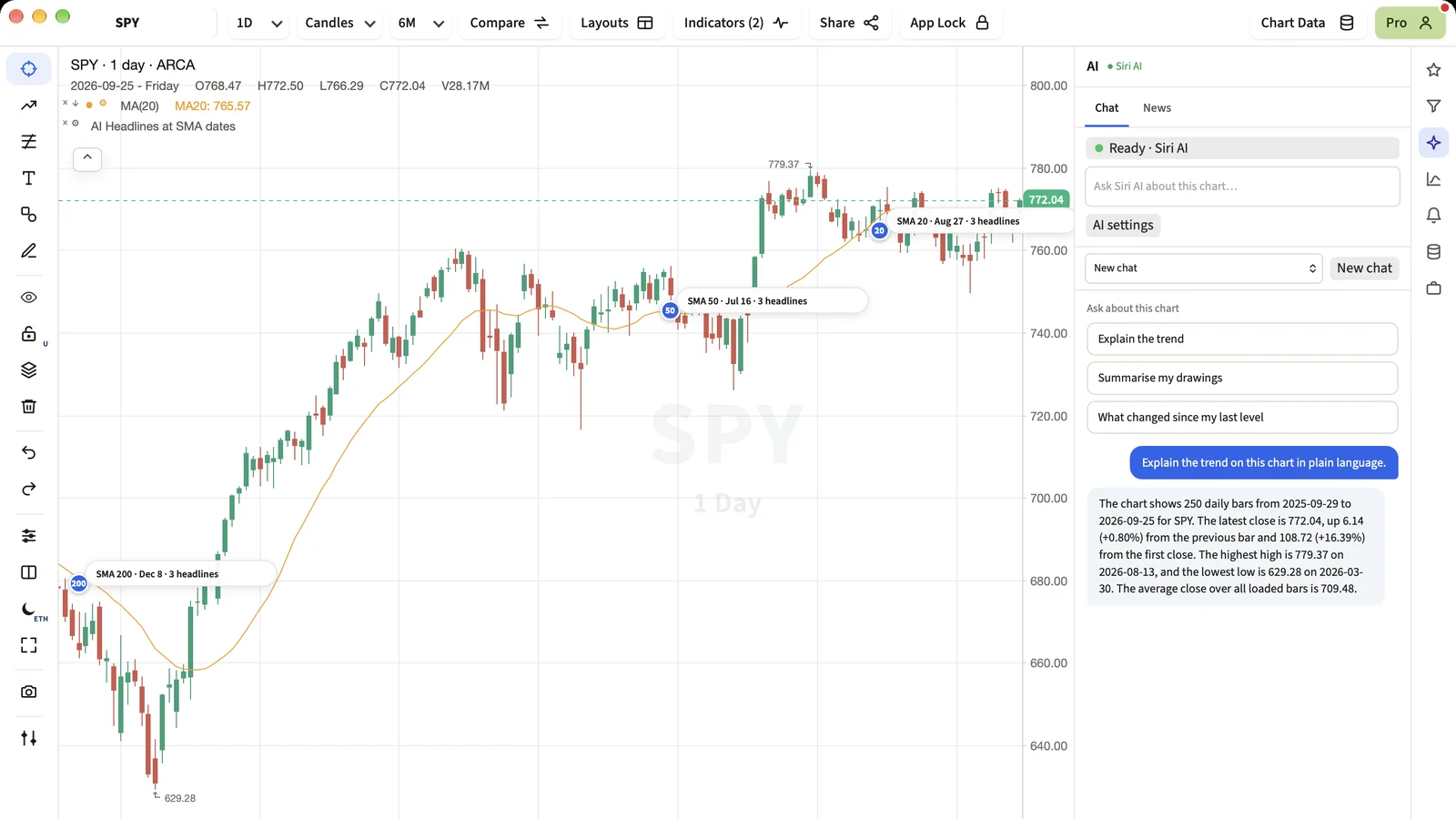
The newest phones and computers ship with an AI model on the device. MyLinedChart uses it, so the chart can explain itself without you signing up for anything.
Short Answer
If your device has built-in AI, MyLinedChart's AI panel uses it first. Ask a question about the chart and the on-device model answers, using exact figures the app has already worked out.
Which devices
- iPhone, iPad and Mac with Apple Intelligence: Siri AI, the on-device Apple model.
- Android phones and Chromebooks with Gemini Nano: Google's on-device model.
- Copilot+ PCs: Windows AI, Microsoft's on-device model.
- Other devices: the option does not appear, and your key or connected AI app is used instead.
Why the app gives it facts
On-device models are good at explaining and weak at arithmetic across hundreds of bars. MyLinedChart hands the model a short list of exact facts, such as the highest high and its date, the lowest low and the change between them, and asks it to explain them. It is told to quote the numbers as given and never to invent one.
Talking to Siri
On Apple devices MyLinedChart adds two Siri commands. Say Show a symbol in MyLinedChart and Siri asks which symbol, then loads that chart. Say Draw a price line in MyLinedChart and Siri asks at what price, then adds a horizontal line there. A line drawn this way is your own line, exactly as if you had drawn it.
Next Step
Open the AI panel. If it says Ready with your device's AI, ask Explain the trend on a chart you know well and compare the answer with what you see.
FAQ
Is my chart sent to Apple, Google or Microsoft?
No. The built-in model runs on your device. MyLinedChart does not use the cloud versions of these models.
Why don't I see the option?
Your device or its settings do not have the on-device model available. On Apple devices, Apple Intelligence must be on and set to the same language as the device.
Can Siri place a trade?
No. MyLinedChart cannot place orders at all. Siri can show a chart or draw a line.
Sample Structured Chart-Data Exports
Review how chart drawings, annotations, OHLC, volume, and execution context become reusable structured data.