
Article
Composer by SoFi Holdings on Your Chart
MyLinedChart can now show what you hold in Composer by SoFi directly on your charts. Connect with your own Composer API Key ID and Secret and each symbol you hold gets a "Held: N shares" badge, with no cost basis or entry-price line, since Composer's API does not return one. Prices still come from your regular chart data provider, because Composer has no price history API of its own. The connection is read-only: MyLinedChart never trades, deploys or rebalances anything in Composer.

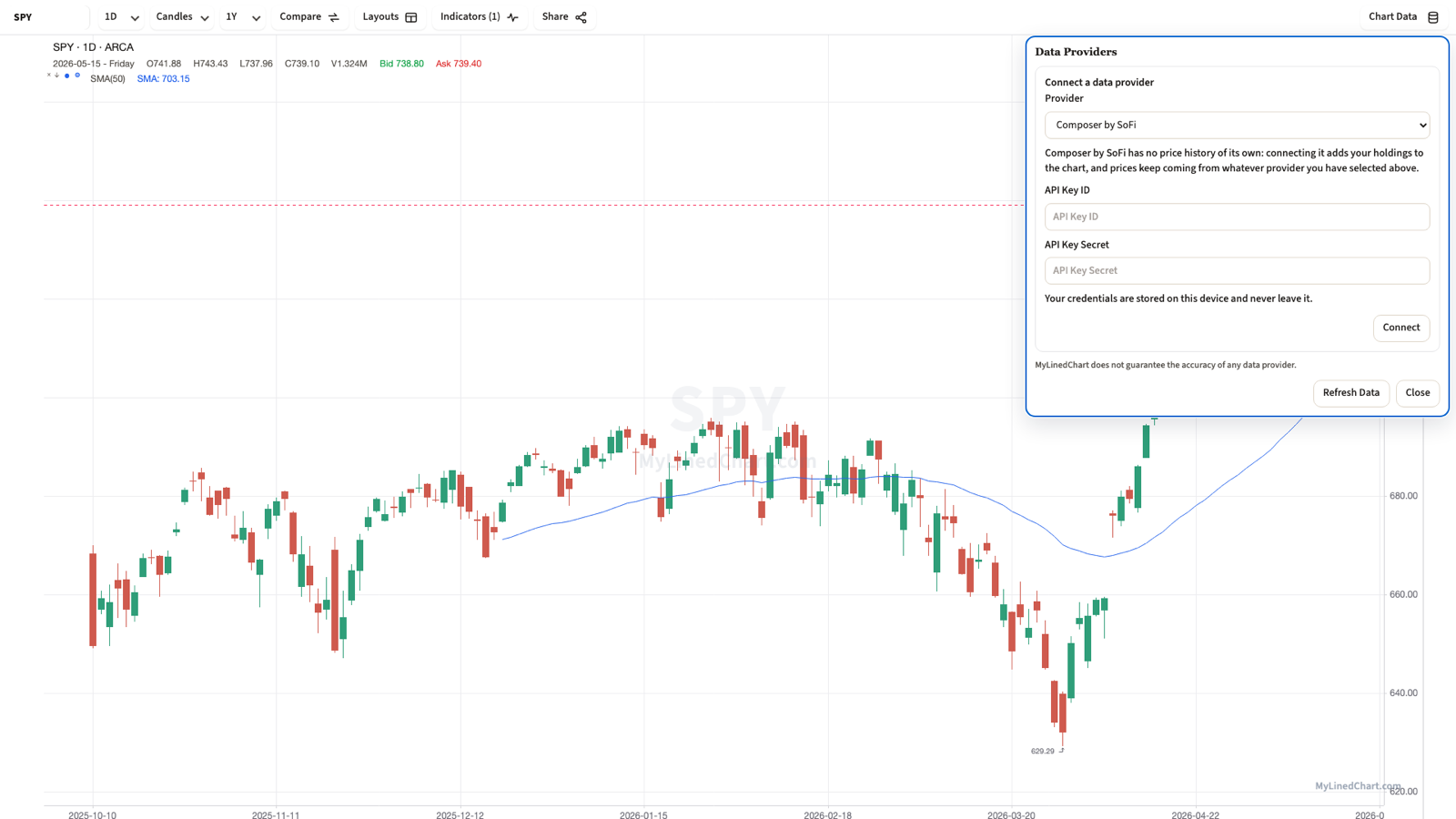
Composer runs the automated strategy; MyLinedChart draws the chart. Connecting the two means a symbol you hold in Composer shows up on its MyLinedChart chart as a badge, without leaving the charting workflow you already use for everything else.
What Connecting Composer Shows You
Once connected, MyLinedChart checks your Composer holdings for the symbol on the active chart. If you hold it, a badge appears reading something like "Held: 12 shares", the same way a broker connection shows an open position.
The badge is the whole feature. It answers one question at a glance, whether you are already holding the name you are charting, without a second screen or a spreadsheet.
Why There Is No Entry Price
Every other position line MyLinedChart draws from a broker connection needs one number the broker's API can supply: the average price you got in at. Composer's API returns what you hold and leaves out what you paid or when a strategy first bought it, so there is nothing to draw a line at.
The missing line comes from a limit in Composer's own API. If Composer starts returning cost basis, the badge is the natural place to add it.
Where Prices Come From
Composer has no price-history API, so it was never going to be the source of candles. MyLinedChart keeps using your regular chart data provider, see Data provider fit, for OHLC, volume and everything else the chart draws. Composer only answers one question: what do I currently hold in this symbol.
Keeping the two paths separate also means a symbol Composer does not price (say, one your data provider does not carry) can still show a Held badge as long as Composer reports the position; the badge and the candles are two independent data paths.
Setup and What Stays Read-Only
Generate a Composer API Key ID and Secret from your own Composer account and enter them where MyLinedChart asks for a data connection, the same pattern as connecting a broker or market-data provider. See Broker API Keys: What Each One Actually Asks For for how that compares across other providers.
The connection is one-way and read-only. MyLinedChart never trades, deploys a new strategy, or rebalances anything inside Composer; it only asks what you currently hold. Requests go from your device to Composer using your keys, never through a MyLinedChart server.
Composer was acquired by SoFi in June 2026. The API Key ID and Secret pairing described here is Composer's own account-level connection method.
FAQ
Does MyLinedChart show my Composer cost basis or entry price?
No. Composer's API returns your current holdings without what you paid for them, so there is no entry-price line, only a "Held: N shares" badge.
Where do the candles on the chart come from if I connect Composer?
From your regular chart data provider. Composer has no price-history API, so it only supplies the holdings badge; the chart's OHLC and volume still come from whichever provider you connected under Data provider fit.
Can MyLinedChart place trades or rebalance my Composer strategies?
No. The connection is read-only. MyLinedChart never trades, deploys or rebalances anything in Composer.
Does my Composer API key ever reach MyLinedChart's servers?
No. Requests go from your device directly to Composer using your own key and secret, never through a MyLinedChart server.
Sample Structured Chart-Data Exports
Review how chart drawings, annotations, OHLC, volume, and execution context become reusable structured data.