
Article
TradingView AI Chart Copilot vs MyLinedChart
TradingView's AI Copilot and MyLinedChart both put an AI beside your chart. The Copilot is TradingView's own assistant, sold for $7.50 a month on top of a TradingView plan. MyLinedChart is a charting app that uses the AI built into your device or the AI you already use. Checked 28 September 2026.

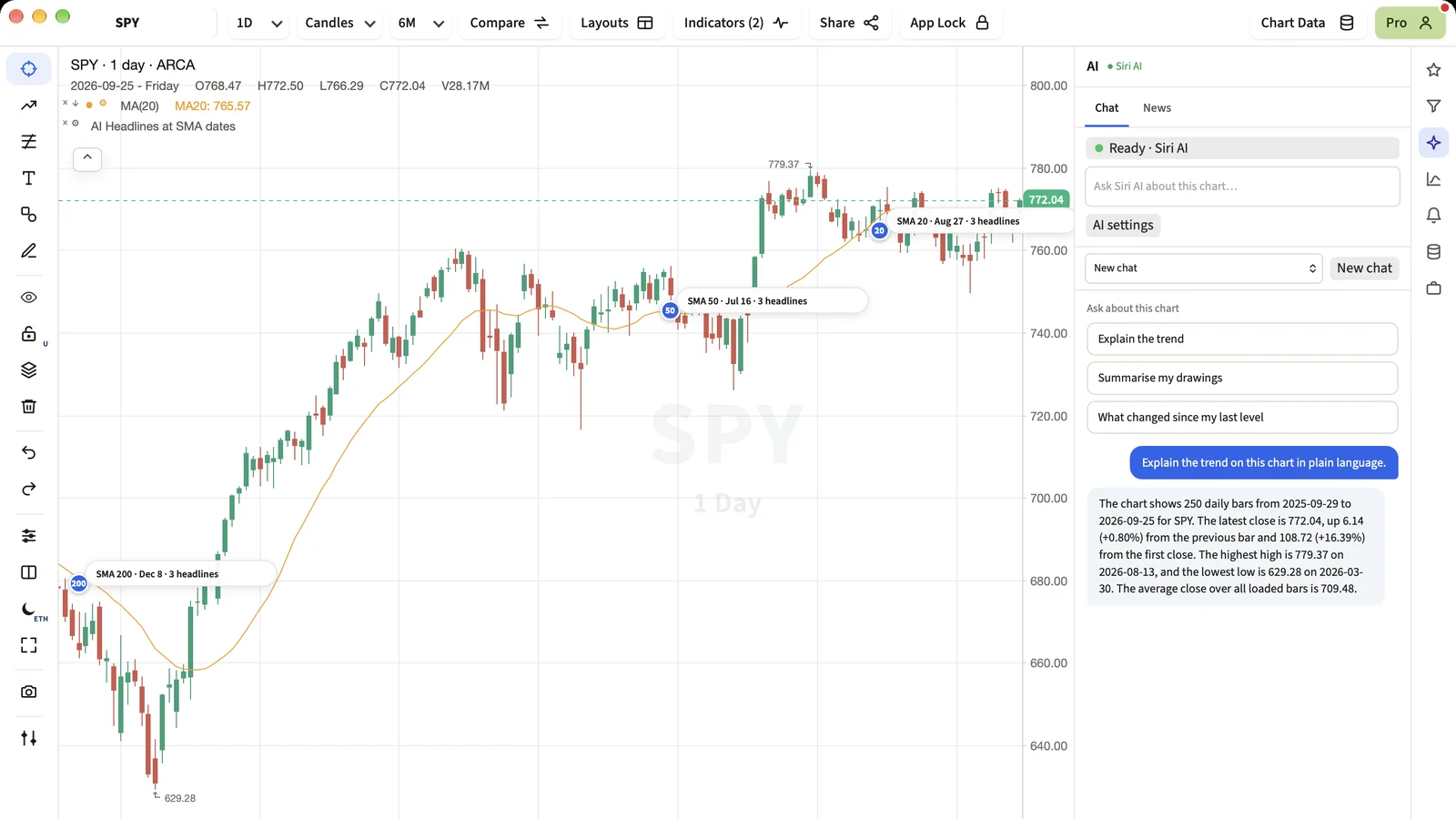
TradingView now sells its own AI Copilot inside its app. The Copilot is a real step for the most popular charting site, and many traders will try it. MyLinedChart has a chart AI too, built in a different way. Here is a fair comparison, as both read on 28 September 2026.
Short Answer
Pick the TradingView AI Copilot if you already chart on TradingView and are happy to pay $7.50 a month for an assistant beside those charts. Pick MyLinedChart if you want to choose the AI yourself, including the one already on your device, and want your chart and drawings as data you can export.
What the AI Chart Copilot Is
TradingView offers the AI Copilot inside its own app. It opens beside your TradingView chart with suggested questions such as quizzing you on the chart or rating your setup. The app asks $7.50 a month to start using it, on top of your TradingView plan.
TradingView also announced a public beta of its AI Chart Copilot on its blog on 2 April 2026, which describes it reading the chart you have open and drawing lines from a plain request.
- TradingView AI Chart Copilot public beta
TradingView's own announcement, 2 April 2026.
What MyLinedChart's AI Is
MyLinedChart is a charting app for Mac, Windows, iPhone, iPad and Android that charts data from the broker or data provider you already have. Its AI panel has a chat about the chart you are on, and you choose which AI answers.
Before the AI says anything, the app works out the facts itself: the trend, where price sits against your drawings, your last level. The AI's job is to explain those facts in plain words. Your chats stay on your device. For more on the chat, see Ask Your AI About the Chart, Inside MyLinedChart.
- The AI built into your device, with no account: Siri AI on iPhone, iPad and Mac, Gemini Nano on Android, Windows AI on Copilot+ PCs.
- Claude, ChatGPT or Gemini, the AI you already use.
- On the direct download for Mac and Windows, an AI app you already use, such as Claude Desktop, Cursor or Codex, over a direct connection. That AI can read the chart and propose drawings and indicators, and every change is labelled as AI and can be undone.
Side by Side
| What matters | TradingView AI Chart Copilot | MyLinedChart |
|---|---|---|
| Whose AI | TradingView's own | Your device's AI or the AI you already use |
| Bring your own AI | No published option | Yes |
| Where it runs | Inside the TradingView app | App for Mac, Windows, iPhone, iPad and Android |
| Usage limit | $7.50 a month on top of a TradingView plan | Device AI runs on your device at no extra cost |
| Pine Script | Can try to write it, per one review | Import a Pine Script as an indicator, and export your indicators as Pine Script |
| Export drawings and notes as data | Not described | CSV, JSON or Excel, with bars and indicator values |
| Price | TradingView plans $14.95 to $239.95 a month billed monthly, plus $7.50 a month for AI Copilot | $24.99 a month or $224.91 a year, after a 7-day free trial |
- TradingView pricing
TradingView's plans and their AI screener limits.
Where TradingView Is Ahead
- The Copilot sits inside the charting site millions of traders already use, with TradingView's own data and community scripts.
- TradingView has a free plan for charting, and the Copilot is one add-on away.
- If all your analysis already lives in TradingView, there is nothing new to install.
Where MyLinedChart Is Different
- You choose the AI. The one on your device costs nothing extra, and an AI you already pay for works too.
- The app computes the numbers before the AI speaks, so the answer rests on exact figures from your chart.
- Everything you mark up is data. Drawings, levels, notes, bars and indicators export together, so your own AI or script can work with them.
- Your chats stay on your device, and MyLinedChart is read-only: it never places, stages or suggests an order.
Using Both
The two can sit side by side. A formula indicator built in MyLinedChart exports as a Pine Script you can open in TradingView, and a Pine Script you already have imports into MyLinedChart as a formula indicator. See Export Your Indicator as Pine Script.
FAQ
How much does the TradingView AI Copilot cost?
The TradingView app offers AI Copilot for $7.50 a month, checked 28 September 2026. That is on top of your TradingView plan.
Can I use my own AI with TradingView's AI Chart Copilot?
Not that TradingView has published, checked 28 September 2026. The Copilot is TradingView's own assistant. MyLinedChart lets you use the AI built into your device, Claude, ChatGPT or Gemini, or on the direct download an AI app you already use.
Does MyLinedChart need an AI subscription?
No. The AI built into your device (Siri AI, Gemini Nano or Windows AI on Copilot+ PCs) works with no subscription. Claude, ChatGPT, Gemini or an AI app is optional.
Can either one place trades?
MyLinedChart cannot. It is read-only and has no order function. TradingView describes the Copilot as a helper for reading market moves and managing your chart setup.
Sample Structured Chart-Data Exports
Review how chart drawings, annotations, OHLC, volume, and execution context become reusable structured data.